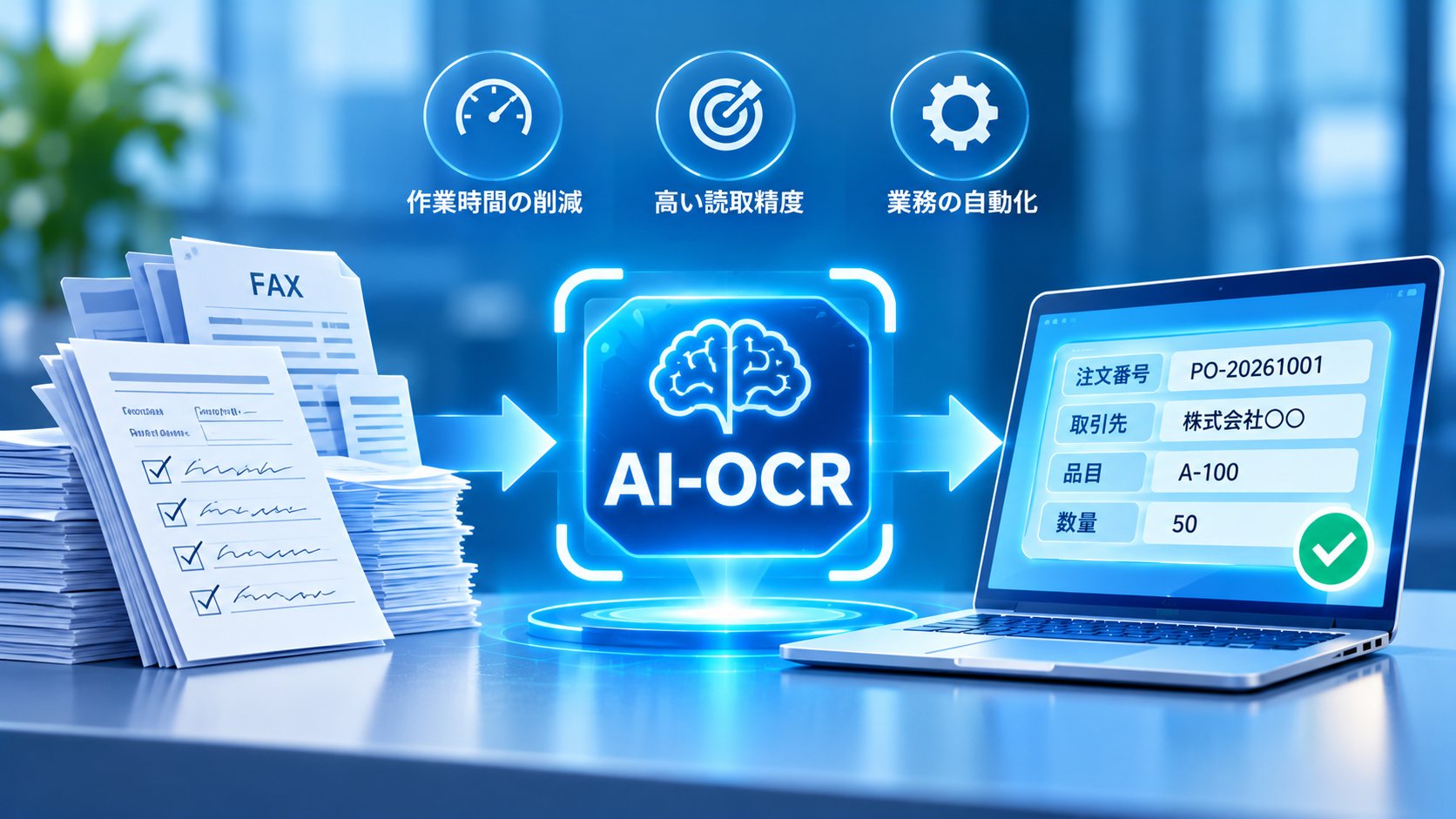
AI OCR & DOCUMENT AUTOMATION
Turn Paper, PDFs, and Handwritten Forms
Into Actionable Business Data
From intelligent document recognition to data validation and ERP integration.
→
→
→
Go beyond text extraction to streamline data entry, verification, and system registration.
BUSINESS PROCESS DIGITALIZATION
Is Your Team Still Manually Entering Data From Paper Documents and PDFs?
Manufacturing companies, logistics providers, wholesalers, and accounting departments handle large volumes of purchase orders, invoices, delivery notes, and inspection records. However, different document formats and manual data entry can make routine processing time-consuming and increase the risk of errors.
One way to address these challenges is AI-powered Optical Character Recognition (AI OCR). AI OCR helps extract text and relevant information from scanned documents, images, PDFs, and certain handwritten forms. When combined with validation workflows and enterprise system integration, it can support automation across the entire document-processing workflow.
This article explains what AI OCR is, how it differs from traditional OCR, where it can be applied, what affects recognition accuracy, and how businesses can implement document automation from an initial proof of concept to production operations.
What You Will Learn
- What AI OCR is and how it differs from traditional OCR
- Which business documents can be digitized
- How document extraction, validation, and system integration work
- Practical applications in manufacturing, logistics, and accounting
- Recognition accuracy, security, and implementation considerations
- Development costs and a five-step implementation roadmap
01. What Is AI OCR? How Does It Differ From Traditional OCR?
Optical Character Recognition (OCR) is a technology that identifies text in images or scanned documents and converts it into machine-readable text.
AI OCR refers to OCR solutions that use artificial intelligence techniques, such as machine learning and deep learning, to recognize text and, depending on the solution, support more complex document-processing tasks.
Some AI OCR solutions are designed to handle handwritten text and varying document layouts more effectively. However, traditional OCR products may also provide advanced recognition and layout analysis capabilities. AI OCR is not automatically more accurate in every situation.
The most important consideration is whether a solution can achieve the required performance on the documents used in your business.
| Comparison | Traditional OCR | AI OCR |
|---|---|---|
| Core Function | Recognizes text in images | Uses AI techniques for text recognition |
| Structured Forms | Supported by many solutions | Supported |
| Handwriting | Capabilities vary by product | Some solutions offer enhanced handwriting recognition |
| Document Layouts | Some approaches require fixed layouts | Some solutions support variable layouts |
| Typical Applications | Repetitive processing of consistent document formats | Processing diverse forms and handwritten documents |
Is AI OCR the Same as Generative AI?
AI OCR and generative AI serve different purposes.
AI OCR primarily focuses on recognizing text and extracting information from documents. Generative AI can support additional tasks, such as document classification, summarization, and answering questions based on extracted information.
Multimodal AI models and document-understanding models can also analyze document images directly. However, generative AI may produce incorrect information, making validation particularly important when processing financial figures, quantities, and other critical business data.
Key Takeaway
The goal of AI OCR is not simply to recognize text. Its business value comes from converting document information into usable data and connecting that data to downstream workflows.
02. What Types of Business Documents Can AI OCR Process?
AI OCR can support the digitization of many business documents. However, the information that can be extracted and the level of accuracy depend on document quality, layout, and the selected technology.
| Document Type | Example Data Fields | Business Application |
|---|---|---|
| Purchase Orders | Order date, item codes, quantities, unit prices | Sales and order management |
| Invoices | Supplier, invoice amount, payment due date | Accounting and finance |
| Delivery Notes | Product names, item codes, quantities, delivery dates | Inventory and logistics management |
| Inspection Records | Inspection items, measurements, results | Quality management and MES |
| Production Reports | Production dates, equipment, operators, output | Production and equipment management |
| Application Forms | Applicant information, submission dates, request details | Internal approval workflows |
For example, a company can use AI OCR to extract product codes and quantities from incoming purchase orders and compare them with its internal product master data before creating order records.
In manufacturing, handwritten measurements from inspection sheets can be extracted, reviewed, and transferred to quality management systems.
Some document elements, such as checkboxes, stamps, engineering drawings, and complex tables, may require specialized processing beyond basic text recognition. Technical validation using representative documents is therefore essential.
03. How AI OCR Document Processing Works: From Extraction to System Integration
Business process automation does not end when text is extracted from a document.
In practical enterprise workflows, extracted information must often be reviewed, corrected, validated against reference data, and transferred into existing business systems.
DOCUMENT PROCESSING WORKFLOW
AI OCR Document Automation Workflow
→
→
→
Information requiring review is corrected and approved before being transferred to enterprise systems.
Step 1: Document Capture
Documents are collected through scanners, email attachments, or file upload interfaces. Image preprocessing may be applied to correct skew, improve readability, and reduce visual noise.
Step 2: Text Recognition and Data Extraction
AI OCR identifies text and extracts relevant fields such as supplier names, item codes, quantities, and amounts. Depending on document complexity, layout analysis and table structure recognition may also be required.
Step 3: Validation, Correction, and Data Matching
Extracted information is reviewed through a validation interface, where users can correct errors. The data may also be checked against product master data, supplier records, purchase orders, or other reference information.
Step 4: Integration With Business Systems
Validated information is transferred to ERP, accounting, sales management, or Manufacturing Execution Systems (MES) using APIs, CSV interfaces, batch processes, or other supported integration methods.
If a legacy system does not provide APIs, the development team must evaluate available interfaces and operational constraints before selecting an integration approach.
Implementation Tip
Avoid automatically registering every AI OCR result without verification. Critical business data should pass appropriate validation, matching, and approval steps before entering production systems.
04. AI OCR Use Cases in Manufacturing, Logistics, and Accounting
AI OCR is particularly relevant to business processes that involve repetitive document handling and manual data transfer between paper records and digital systems.
The following examples illustrate how organizations can apply AI OCR to improve document-related workflows.
Manufacturing: Digitizing Inspection Records and Production Reports
Manufacturing facilities often use paper-based equipment inspection forms, quality control records, and daily production reports.
AI OCR can extract measurements and operational data from these documents. After validation, the information can be transferred into quality management platforms or MES.
This approach can reduce duplicate data entry and make historical records easier to search and analyze. However, incorrect recognition of measurements or inspection results can affect quality decisions, so critical fields require appropriate verification.
Logistics and Wholesale: Automating Purchase Order and Delivery Note Processing
Logistics providers and wholesale distributors frequently receive purchase orders and delivery notes in different formats from multiple business partners.
AI OCR can extract item codes, quantities, and delivery dates, then compare them against product master data and order management systems.
Where business partners use different product identifiers or naming conventions, additional mapping rules and exception-handling workflows may be required.
Accounting: Supporting Invoice Processing and Data Reconciliation
AI OCR can extract supplier information, invoice amounts, invoice dates, and payment due dates to support data entry into accounting systems.
When combined with purchase order and delivery data, it can also help identify discrepancies and prioritize records that require manual review.
Businesses must still comply with applicable tax, accounting, and document retention requirements. Digitizing an invoice through AI OCR does not automatically satisfy every regulatory obligation.
05. AI OCR Accuracy, Limitations, and Security Considerations
Recognition accuracy is one of the most important factors when evaluating AI OCR solutions.
No OCR system can guarantee perfect recognition across every document type. Results depend on the condition of the source documents, their layouts, and the capabilities of the selected solution.
Factors That Affect Recognition Accuracy
- Image resolution, skew, and scanning quality
- Handwriting styles and overlapping characters
- Stamps, table borders, background colors, and visual noise
- Complex tables and multi-page line items
- Different document layouts across suppliers or customers
- Documents containing multiple languages
Text Recognition Accuracy Is Not the Same as Business Accuracy
For example, an AI OCR system may correctly recognize most characters in an invoice but still misread one digit in the total amount.
Although the overall character recognition rate may appear high, that single error could have serious business consequences.
Therefore, a proof of concept should evaluate field-level extraction accuracy for critical information, such as item codes, amounts, quantities, and dates, rather than relying only on overall character recognition rates.
Organizations should also assess correction time, exception rates, and total processing time to understand whether the solution provides meaningful operational benefits.
Data Security and Governance
Business documents may contain confidential commercial information or personal data.
When using cloud-based AI OCR services, organizations should review where information is transmitted and stored, how long it is retained, who can access it, and whether service providers may use submitted data for other purposes.
For highly sensitive documents, businesses may also need to compare cloud-based and on-premises deployment options based on internal security requirements.
Evaluation Tip
Measure not only recognition accuracy but also the time required for human review, correction, and exception handling. These factors determine whether AI OCR actually improves the workflow.
06. AI OCR Implementation Costs and a Five-Step Roadmap
AI OCR implementation costs depend on document types, processing volumes, required accuracy, integration complexity, and operational requirements.
The cost structure also differs depending on whether a company uses an existing AI OCR service or develops a customized document-processing system.
| Cost Category | Typical Scope |
|---|---|
| Initial Analysis and Setup | Document assessment, extraction fields, processing rules |
| AI OCR Service Fees | Usage charges based on pages, volume, or service plans |
| Application Development | Review interfaces, approval workflows, exception handling |
| System Integration | APIs and data connections with ERP, MES, or accounting systems |
| Operations and Maintenance | Monitoring, new document formats, configuration changes, support |
Before committing to a full implementation, businesses can begin with a limited proof of concept using representative documents to assess technical feasibility, extraction accuracy, and potential workflow improvements.

AI OCR IMPLEMENTATION ROADMAP
Five Steps to Implement AI OCR
→
Document Samples
→
PoC & Validation
→
Development
→
Operations
Validate the solution using real business documents before scaling into production.
Step 1: Analyze Business Processes and Document Types
Identify document volumes, formats, current data entry procedures, review requirements, and operational bottlenecks. Prioritize processes where automation could provide meaningful benefits.
Step 2: Collect Representative Document Samples
Gather PDFs and scanned documents used in daily operations. Include variations in layouts, handwriting, image quality, and other challenging cases to support realistic evaluation.
Step 3: Conduct a Proof of Concept
Evaluate critical field extraction accuracy, manual correction effort, processing time, and technical constraints. Use the findings to determine whether the solution is suitable for production.
Step 4: Develop and Integrate the Solution
Implement validation interfaces, master data matching, approval workflows, and connections to ERP, MES, or other business applications.
Step 5: Deploy, Monitor, and Improve
After deployment, monitor recognition errors, exception handling, and usage patterns. Adjust configurations and expand supported document types as business needs evolve.
Not every project requires a separate PoC phase. When document formats are consistent and the selected technology has already been validated for the intended use case, the implementation process may be simplified.
07. How BAP Supports AI OCR and Enterprise Document Automation
Implementing AI OCR effectively requires more than text recognition technology. Businesses also need document-specific processing rules, validation workflows, secure data management, and integration with existing applications.
BAP supports AI and OCR-based solution development alongside enterprise software engineering, including web applications, ERP, MES, databases, and API integration.
Through its development teams in Japan and Vietnam, BAP can support organizations in evaluating technical feasibility, developing document-processing applications, integrating enterprise systems, and maintaining solutions after deployment.
BAP SOLUTION JAPAN
Ready to Reduce Manual Data Entry From Paper Documents and PDFs?
Whether you want to automate purchase order entry, digitize inspection records, or connect invoice data to existing business systems, BAP can help you explore suitable implementation options.
Our team can begin by reviewing your document types and current workflows, then assess recognition accuracy using representative samples when appropriate.
Contact BAP to discuss AI OCR implementation and enterprise system integration.
Conclusion: AI OCR helps businesses convert information from paper documents, PDFs, and handwritten forms into structured digital data. However, recognizing text alone does not automate an entire business process. Effective implementation also requires data validation, master data matching, exception handling, and integration with existing enterprise systems. By evaluating recognition performance using real documents and implementing automation in stages, organizations can build document-processing workflows that are more efficient, reliable, and suitable for long-term operations.